Da tempo volevo controllare se avevo file duplicati, mi ricordavo di aver letto di un programma che controlla in modo automatico, oggi lo ho installato e testato: fdupes !
Per istruzioni vedi fdupes man page.
It was a long time since I wanted to check my hd for duplicate files, I remembered reading about a program that automatically checks, today I've installed and tested it: fdupes !
For instructions fdupes man page.
Visualizzazione post con etichetta Scientific Linux. Mostra tutti i post
Visualizzazione post con etichetta Scientific Linux. Mostra tutti i post
sabato 16 giugno 2012

mercoledì 21 marzo 2012
Dovecot Update
Dopo aver fatto yum update sul mio server di posta Scientific Linux 6.2, il client di posta evolution non riesce più a comunicare con il server IMAP Dovecot, aggiornato alla release 2.1.1-2_132.
Il log sul server mostra il seguente errore:
Error: user *****: Initialization failed: namespace configuration error: inbox=yes namespace missing
Per correggere bisogna modificare il file /etc/dovecot/conf.d/10-mail.conf.rpmnew correggendolo secondo le modifiche presenti nel /etc/dovecot/conf.d/10-mail.conf, quindi rinominarlo .conf e riavviare il servizio. Tutto è tornato a funzionare come prima.
After updating my mail server (Scientific Linux 6.2) with yum update, the evolution mail client stopped communicating with Dovecot IMAP server, updated to the 2.1.1-2_132 release.
In the server log I found:
Error: user *****: Initialization failed: namespace configuration error: inbox=yes namespace missing
To correct this behaviour you have to modify the /etc/dovecot/conf.d/10-mail.conf.rpmnew file to match the configuration in the /etc/dovecot/conf.d/10-mail.conf file,then rename it .conf and restart the Dovecot server.
Now everything is working like before.
Il log sul server mostra il seguente errore:
Error: user *****: Initialization failed: namespace configuration error: inbox=yes namespace missing
Per correggere bisogna modificare il file /etc/dovecot/conf.d/10-mail.conf.rpmnew correggendolo secondo le modifiche presenti nel /etc/dovecot/conf.d/10-mail.conf, quindi rinominarlo .conf e riavviare il servizio. Tutto è tornato a funzionare come prima.
After updating my mail server (Scientific Linux 6.2) with yum update, the evolution mail client stopped communicating with Dovecot IMAP server, updated to the 2.1.1-2_132 release.
In the server log I found:
Error: user *****: Initialization failed: namespace configuration error: inbox=yes namespace missing
To correct this behaviour you have to modify the /etc/dovecot/conf.d/10-mail.conf.rpmnew file to match the configuration in the /etc/dovecot/conf.d/10-mail.conf file,then rename it .conf and restart the Dovecot server.
Now everything is working like before.
giovedì 8 marzo 2012
Syncro PIM & News with Android
È comodo avere Agenda e News sincronizzati tra i miei computer e il tablet Android.
Chiaramente basterebbe utilizzare le Web Application Google Calendar e Reader per aver risolto il problema, ma io sul desktop utilizzo Evolution (posta e calendario) e Liferea (rss feed).
Nessun problema:
In Evolution basta creare un nuovo calendario, come tipo impostare Google, come nome il nome del calendario google e come nome utente il nome dell'account senza @google.com .
Per Liferea basta seguire le istruzioni in Subscribing to Google Reader, cioè Abbonamenti->Nuova Fonte e selezionare Google Reader.
It is useful to have Calendar and News Feed synchronized between my pc and the Android tablet. To solve the problem I could use the Web Applications Google Calendar and Reader, but on my desktop I use Evolution (Mail and Calendar) and Liferea (rss feed).
No problem:
In Evolution you can create a new Calendar, set Google as type, Google's calendar name as name and you account (without @google.com) an user name.
For Liferea you can follow these instructions: Subscribing to Google Reader
Chiaramente basterebbe utilizzare le Web Application Google Calendar e Reader per aver risolto il problema, ma io sul desktop utilizzo Evolution (posta e calendario) e Liferea (rss feed).
Nessun problema:
In Evolution basta creare un nuovo calendario, come tipo impostare Google, come nome il nome del calendario google e come nome utente il nome dell'account senza @google.com .
Per Liferea basta seguire le istruzioni in Subscribing to Google Reader, cioè Abbonamenti->Nuova Fonte e selezionare Google Reader.
It is useful to have Calendar and News Feed synchronized between my pc and the Android tablet. To solve the problem I could use the Web Applications Google Calendar and Reader, but on my desktop I use Evolution (Mail and Calendar) and Liferea (rss feed).
No problem:
In Evolution you can create a new Calendar, set Google as type, Google's calendar name as name and you account (without @google.com) an user name.
For Liferea you can follow these instructions: Subscribing to Google Reader
martedì 6 marzo 2012
Remote Control
Primo obiettivo: controllare dal tablet i computer windows, Linux e macchine virtuali VirtualBox.
I computer windows possono essere controllati tramite VNC o RDP: entrambi funzionano correttamente.
Per controllare le macchine virtuali VirtualBox si utilizza il protocollo RDP, che funziona correttamente.
Attualmente controllo i computer Linux tramite server freeNX e client Remmina, ma non esiste alcun client NX per Android.
La versione 4 di NX supporterà un client in HTML5, ed è già possibile testarlo grazie alla beta gratuita: funziona bene sul desktop, ma sul tablet funziona solamente con il browser Skyfire.
Però c'è un problema: per interagire avrei bisogno della tastiera virtuale ... come attivarla ??
Ma esiste un altro protocollo per il controllo remoto per linux: Xrdp. Su SL6 (RHEL6) funziona correttamente "out of the box": basta installare il pacchetto ed avviare il servizio.
A questo punto il problema è il client Android: sono riuscito a connettermi correttamente solo con il client di xtralogic.
First target: remote control of windows, Linux and VirtualBox sessions from the tablet.
Windows computers can be controlled by means of VNC or RDP: both work well.
Actually I control Linux PC by means of freeNX server and the remmina client, but there's no NX android client !!
NX version 4 will support an HTML5 client, and you can test it thanks to the free beta: it works very well on the desktop, but on Android I got it working only with skyfire browser.
But there is another problem: to interact I need a virtual keyboard ... how to activate it ??
There is another remote control protocol for linux: Xrdp. With SL6 (RHEL6) it works correctly "out of the box": install the rpm package and start the service.
But now the problem is to find an appropriate Android client: only xtralogic client works correctly.
I computer windows possono essere controllati tramite VNC o RDP: entrambi funzionano correttamente.
Per controllare le macchine virtuali VirtualBox si utilizza il protocollo RDP, che funziona correttamente.
Attualmente controllo i computer Linux tramite server freeNX e client Remmina, ma non esiste alcun client NX per Android.
La versione 4 di NX supporterà un client in HTML5, ed è già possibile testarlo grazie alla beta gratuita: funziona bene sul desktop, ma sul tablet funziona solamente con il browser Skyfire.
Però c'è un problema: per interagire avrei bisogno della tastiera virtuale ... come attivarla ??
Ma esiste un altro protocollo per il controllo remoto per linux: Xrdp. Su SL6 (RHEL6) funziona correttamente "out of the box": basta installare il pacchetto ed avviare il servizio.
A questo punto il problema è il client Android: sono riuscito a connettermi correttamente solo con il client di xtralogic.
First target: remote control of windows, Linux and VirtualBox sessions from the tablet.
Windows computers can be controlled by means of VNC or RDP: both work well.
Actually I control Linux PC by means of freeNX server and the remmina client, but there's no NX android client !!
NX version 4 will support an HTML5 client, and you can test it thanks to the free beta: it works very well on the desktop, but on Android I got it working only with skyfire browser.
But there is another problem: to interact I need a virtual keyboard ... how to activate it ??
There is another remote control protocol for linux: Xrdp. With SL6 (RHEL6) it works correctly "out of the box": install the rpm package and start the service.
But now the problem is to find an appropriate Android client: only xtralogic client works correctly.
mercoledì 8 febbraio 2012
RPM packages for SL 6.2
Qui di seguito i link ad alcuni dei packages che ho compilato per Scientific Linux 6.2 (CENTOS/RHEL).
Here I publish the links to some packages I've compiled for Scientific Linux 6.2 (CENTOS/RHEL).
gnome-schedule-2.1.5-2.el6.noarch.rpm
system-config-network-1.6.3-2.el6.noarch.rpm
system-config-network-tui-1.6.3-2.el6.noarch.rpm
system-config-samba-1.2.92-1.el6.noarch.rpm
system-config-samba-docs-1.0.9-2.el6.noarch.rpm
amule-2.2.5-2.x86_64.rpm
amule-nogui-2.2.5-2.x86_64.rpm
xchat-amule-2.2.5-2.x86_64.rpm
flamerobin-0.9.2-3.el6.x86_64.rpm
hostapd-0.7.3-4.el6.x86_64.rpm
hostapd-logwatch-0.7.3-4.el6.x86_64.rpm
remmina-0.9.3-3.el6.x86_64.rpm
remmina-devel-0.9.3-3.el6.x86_64.rpm
remmina-plugins-common-0.9.2-2.el6.x86_64.rpm
remmina-plugins-nx-0.9.2-2.el6.x86_64.rpm
remmina-plugins-rdp-0.9.2-2.el6.x86_64.rpm
remmina-plugins-telepathy-0.9.2-2.el6.x86_64.rpm
remmina-plugins-vnc-0.9.2-2.el6.x86_64.rpm
remmina-plugins-xdmcp-0.9.2-2.el6.x86_64.rpm
Here I publish the links to some packages I've compiled for Scientific Linux 6.2 (CENTOS/RHEL).
gnome-schedule-2.1.5-2.el6.noarch.rpm
system-config-network-1.6.3-2.el6.noarch.rpm
system-config-network-tui-1.6.3-2.el6.noarch.rpm
system-config-samba-1.2.92-1.el6.noarch.rpm
system-config-samba-docs-1.0.9-2.el6.noarch.rpm
amule-2.2.5-2.x86_64.rpm
amule-nogui-2.2.5-2.x86_64.rpm
xchat-amule-2.2.5-2.x86_64.rpm
flamerobin-0.9.2-3.el6.x86_64.rpm
hostapd-0.7.3-4.el6.x86_64.rpm
hostapd-logwatch-0.7.3-4.el6.x86_64.rpm
remmina-0.9.3-3.el6.x86_64.rpm
remmina-devel-0.9.3-3.el6.x86_64.rpm
remmina-plugins-common-0.9.2-2.el6.x86_64.rpm
remmina-plugins-nx-0.9.2-2.el6.x86_64.rpm
remmina-plugins-rdp-0.9.2-2.el6.x86_64.rpm
remmina-plugins-telepathy-0.9.2-2.el6.x86_64.rpm
remmina-plugins-vnc-0.9.2-2.el6.x86_64.rpm
remmina-plugins-xdmcp-0.9.2-2.el6.x86_64.rpm
venerdì 3 febbraio 2012
system-config-network per RHEL6
Red Hat Enterprise Linux 6 (e derivati) non contiene l'utility grafica di configurazione della rete system-config-network, poichè si affida completamente a network manager. Per ottenerla basta ricompilare l'RPM dell'ultima release di Fedora ed installare i due pacchetti così ottenuti.
Altrimenti bisogna editare a mano i file in /etc/sysconfig/network-script/
Red Hat Enterprise Linux 6 (and cloned distros) does not have the network GUI conf utility system-config-network, as it completely relies on network manager. To get it back you must rebuild the RPM package from the last fedora release and then install the two packages you get.
Otherwise you have to manually edit files in /etc/sysconfig/network-script/
Altrimenti bisogna editare a mano i file in /etc/sysconfig/network-script/
Red Hat Enterprise Linux 6 (and cloned distros) does not have the network GUI conf utility system-config-network, as it completely relies on network manager. To get it back you must rebuild the RPM package from the last fedora release and then install the two packages you get.
Otherwise you have to manually edit files in /etc/sysconfig/network-script/
mercoledì 23 novembre 2011
One Appl. a Day .... Flamerobin
Flamerobin è un Database Administrator per il RDBMS firebird (http://www.flamerobin.org/). Che io sappia è l'unico nativo per linux, ma viene fornito anche in versione Win32 e Win64. La cosa che mi piace di questo programma è che rende semplice l'interazione con il database ma non nasconde gli statement SQL. Questo permette all'utente di imparare il linguaggio SQL e di modificare gli statement generati automaticamente per adattarli ai propri scopi.

Nella repository di Fedora è presente la release 9.2, ma io ho compilato ed installato l'ultima release dal repository SVN di sourceforge.
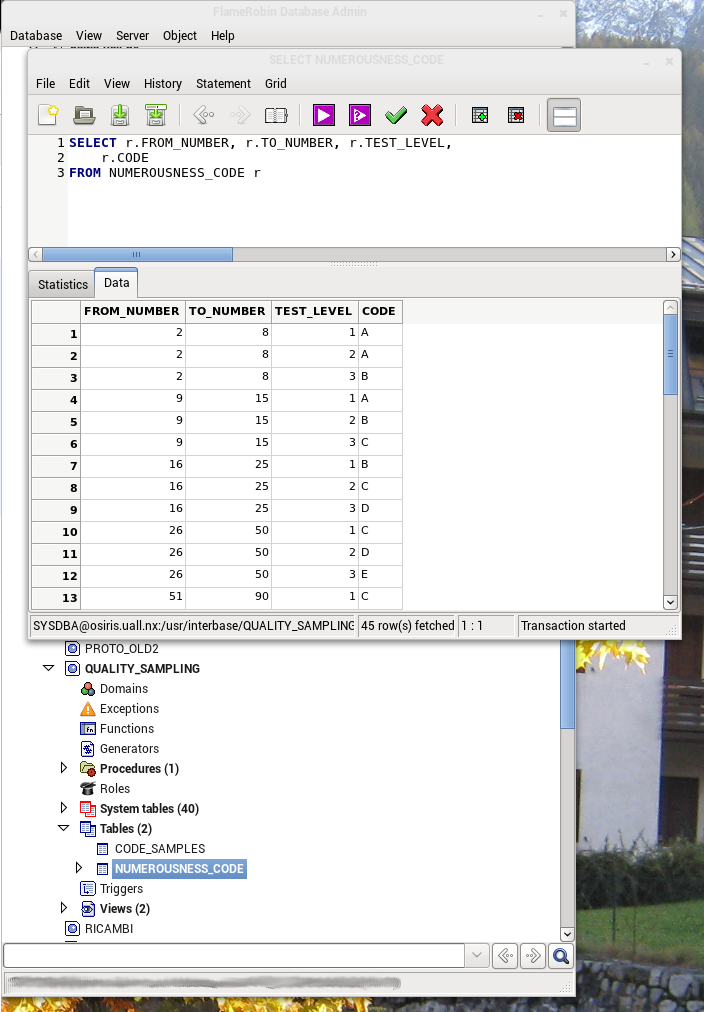
Nella repository di Fedora è presente la release 9.2, ma io ho compilato ed installato l'ultima release dal repository SVN di sourceforge.
FlameRobin is a Database Administrator for the Firebird RDBMS (http://www.flamerobin.org/). To my knowledge it is the only linux native one, but comes also in Win32 and Win64 versions. What I like about this program is that it makes it easy to interact with the database but does not hide the SQL statement. This allows the user to learn SQL statements and to modify the automatically generated statements to fit your purposes.
You can find release 9.2 in Fedora repo, but I have compiled and installed the latest release from the sourceforge SVN repository.
You can find release 9.2 in Fedora repo, but I have compiled and installed the latest release from the sourceforge SVN repository.
martedì 22 novembre 2011
Mi presento
Ciao a Tutti !
Mi presento: sono Umberto Allievi, amo definirmi un artigiano del software, nel senso che sviluppo personalmente soluzioni software (e hardware) per aziende a partire dall'analisi fino all'installazione e all'addestramento del personale. Il mio sito aziendale è www.uall-si.com: è un po' datato ma descrive bene la mia filosofia di lavoro.
Tramite questo blog voglio condividere le mie esperienze riguardo Linux, in particolare Fedora Linux che utilizzo ormai da diversi anni come sistema operativo principale per il lavoro (e non solo), le librerie GTK2 e GTK3 utilizzate con il linguaggio di programmazione C++, il database Firebird nonchè la cross-compilation per ottenere eseguibili Windows 32 e 64 bit.
Malgrado ami linux, molte aziende utilizzano ancora Windows sui desktop, e quindi diventa fondamentale poter compilare il software linux per Windows.
Hello Everybody !
My name is Umberto Allievi, I love to call myself a software artisan, in the sense that I develop software & hardware solutions for companies from the analysis to installation and staff training. My company website is www.uall-si.com: is a bit 'dated but it illustrates my philosophy of work.
Through this blog I will share my experiences about Linux, including Fedora Linux that I've been using for several years as a primary operating system for the job (and beyond), the libraries GTK2 and GTK3 used with the programming language C++, the Firebird database as well as cross-compilation for Windows 32 and 64-bit executable.
Despite my love for linux, many companies still use Windows on the desktop, and then becomes crucial to be able to compile linux software for Windows.
Mi presento: sono Umberto Allievi, amo definirmi un artigiano del software, nel senso che sviluppo personalmente soluzioni software (e hardware) per aziende a partire dall'analisi fino all'installazione e all'addestramento del personale. Il mio sito aziendale è www.uall-si.com: è un po' datato ma descrive bene la mia filosofia di lavoro.
Tramite questo blog voglio condividere le mie esperienze riguardo Linux, in particolare Fedora Linux che utilizzo ormai da diversi anni come sistema operativo principale per il lavoro (e non solo), le librerie GTK2 e GTK3 utilizzate con il linguaggio di programmazione C++, il database Firebird nonchè la cross-compilation per ottenere eseguibili Windows 32 e 64 bit.
Malgrado ami linux, molte aziende utilizzano ancora Windows sui desktop, e quindi diventa fondamentale poter compilare il software linux per Windows.
Hello Everybody !
My name is Umberto Allievi, I love to call myself a software artisan, in the sense that I develop software & hardware solutions for companies from the analysis to installation and staff training. My company website is www.uall-si.com: is a bit 'dated but it illustrates my philosophy of work.
Through this blog I will share my experiences about Linux, including Fedora Linux that I've been using for several years as a primary operating system for the job (and beyond), the libraries GTK2 and GTK3 used with the programming language C++, the Firebird database as well as cross-compilation for Windows 32 and 64-bit executable.
Despite my love for linux, many companies still use Windows on the desktop, and then becomes crucial to be able to compile linux software for Windows.
Iscriviti a:
Post (Atom)