Bisogna installare libpng12 oltre alle librerie indicate nel sito.
You must install libpng12 in addition to the libraries listed on the site.
Visualizzazione post con etichetta Linux. Mostra tutti i post
Visualizzazione post con etichetta Linux. Mostra tutti i post
giovedì 14 febbraio 2013

venerdì 18 gennaio 2013
Fedora 18 and mp3
Selezionare le proprietà di un file mp3 in Fedora 18 causa il blocco di nautilus, Per risolvere: disinstallare il package totem-nautilus
In Fedora 18 clicking on an mp3 file properties hangs nautilus. Solution: remove totem-nautilus package.
In Fedora 18 clicking on an mp3 file properties hangs nautilus. Solution: remove totem-nautilus package.
martedì 11 dicembre 2012
FreeRDP and GnomeShell
FreeRDP does not work correctly under a gnome shell session. To change the session to gnome-fallback from the command line:
dbus-launch gsettings set org.gnome.desktop.session session-name 'gnome-fallback'
Then to return to the gnome-shell from command line:
dbus-launch gsettings set org.gnome.desktop.session session-name 'gnome'
FreeRDP non funziona correttamente con la sessione gnome-shell. Per cambiare il tipo di sessione dalla linea di comando:
dbus-launch gsettings set org.gnome.desktop.session session-name 'gnome-fallback'
Per tornare alla sessione gnome-shell dalla linea di comando:
dbus-launch gsettings set org.gnome.desktop.session session-name 'gnome'
dbus-launch gsettings set org.gnome.desktop.session session-name 'gnome-fallback'
Then to return to the gnome-shell from command line:
dbus-launch gsettings set org.gnome.desktop.session session-name 'gnome'
FreeRDP non funziona correttamente con la sessione gnome-shell. Per cambiare il tipo di sessione dalla linea di comando:
dbus-launch gsettings set org.gnome.desktop.session session-name 'gnome-fallback'
Per tornare alla sessione gnome-shell dalla linea di comando:
dbus-launch gsettings set org.gnome.desktop.session session-name 'gnome'
sabato 16 giugno 2012
fdupes - find duplicate files
Da tempo volevo controllare se avevo file duplicati, mi ricordavo di aver letto di un programma che controlla in modo automatico, oggi lo ho installato e testato: fdupes !
Per istruzioni vedi fdupes man page.
It was a long time since I wanted to check my hd for duplicate files, I remembered reading about a program that automatically checks, today I've installed and tested it: fdupes !
For instructions fdupes man page.
Per istruzioni vedi fdupes man page.
It was a long time since I wanted to check my hd for duplicate files, I remembered reading about a program that automatically checks, today I've installed and tested it: fdupes !
For instructions fdupes man page.
venerdì 13 aprile 2012
Android XRDP Client
Alla ricerca del miglior client gratuito Android per RDP e xRDP .... ho trovato AccessToGo di ERICOM. Funziona prefettamente con xRDP se viene configurato in modo da invare gli scan codes della tastiera, ed è disponibile anche una versione gratuita per iPhone/iPad.
Searching for the best free Android RDP and xRDP client ... I've found ERICOM AccessToGo.
It works perfectly with xRDP once you configure to send the keyboard scan codes, and there is a free version for iPhone/iPad too.
Searching for the best free Android RDP and xRDP client ... I've found ERICOM AccessToGo.
It works perfectly with xRDP once you configure to send the keyboard scan codes, and there is a free version for iPhone/iPad too.
mercoledì 11 aprile 2012
RAR Password recovery
Un mio cliente creando un archivio RAR ha digitato la password in modo errato. Per recuperare la password ho provato ad utilizzare il programma per linux rarcrack:
http://rarcrack.sourceforge.net/
Come programma mi piace ma è leentoooo.
Allora ho scaricato Crark (per windows) da:
http://www.password-crackers.com/en/download.php?cat=99&pid=13
Fantastico: basta scompattare, leggere le istruzioni e immettendo nel file di configurazione la password "corretta" ho ottenuto la password cercata in una frazione di secondo !
A customer of mine has typed the wrong password building a RAR archive. To recover the mistyped password I tested the rarcrack linux program:
http://rarcrack.sourceforge.net/
I liked this program, but it is sloooowwww.
Then I downloaded Crark (for windows) from:
http://www.password-crackers.com/en/download.php?cat=99&pid=13
Fantastic: I've uncompressed it, read the instructions, and by writing the "correct" password in the configuration file I obtained the real password in a fraction of a second !
http://rarcrack.sourceforge.net/
Come programma mi piace ma è leentoooo.
Allora ho scaricato Crark (per windows) da:
http://www.password-crackers.com/en/download.php?cat=99&pid=13
Fantastico: basta scompattare, leggere le istruzioni e immettendo nel file di configurazione la password "corretta" ho ottenuto la password cercata in una frazione di secondo !
A customer of mine has typed the wrong password building a RAR archive. To recover the mistyped password I tested the rarcrack linux program:
http://rarcrack.sourceforge.net/
I liked this program, but it is sloooowwww.
Then I downloaded Crark (for windows) from:
http://www.password-crackers.com/en/download.php?cat=99&pid=13
Fantastic: I've uncompressed it, read the instructions, and by writing the "correct" password in the configuration file I obtained the real password in a fraction of a second !
giovedì 29 marzo 2012
Libreoffice 3.5.2 for F16 x86_64
Ho compilato il pacchetto sorgente di libreoffice della repository
rawhide per F16 x86_64 e ho caricato in mediafire i pacchetti binari:
http://www.mediafire.com/?n1pbq6q7kop24
I have compiled the libreoffice source package from rawhide repo on F16 x86_64 and have uploaded the binary files in mediafire:
http://www.mediafire.com/?n1pbq6q7kop24
http://www.mediafire.com/?n1pbq6q7kop24
I have compiled the libreoffice source package from rawhide repo on F16 x86_64 and have uploaded the binary files in mediafire:
http://www.mediafire.com/?n1pbq6q7kop24
mercoledì 21 marzo 2012
Dovecot Update
Dopo aver fatto yum update sul mio server di posta Scientific Linux 6.2, il client di posta evolution non riesce più a comunicare con il server IMAP Dovecot, aggiornato alla release 2.1.1-2_132.
Il log sul server mostra il seguente errore:
Error: user *****: Initialization failed: namespace configuration error: inbox=yes namespace missing
Per correggere bisogna modificare il file /etc/dovecot/conf.d/10-mail.conf.rpmnew correggendolo secondo le modifiche presenti nel /etc/dovecot/conf.d/10-mail.conf, quindi rinominarlo .conf e riavviare il servizio. Tutto è tornato a funzionare come prima.
After updating my mail server (Scientific Linux 6.2) with yum update, the evolution mail client stopped communicating with Dovecot IMAP server, updated to the 2.1.1-2_132 release.
In the server log I found:
Error: user *****: Initialization failed: namespace configuration error: inbox=yes namespace missing
To correct this behaviour you have to modify the /etc/dovecot/conf.d/10-mail.conf.rpmnew file to match the configuration in the /etc/dovecot/conf.d/10-mail.conf file,then rename it .conf and restart the Dovecot server.
Now everything is working like before.
Il log sul server mostra il seguente errore:
Error: user *****: Initialization failed: namespace configuration error: inbox=yes namespace missing
Per correggere bisogna modificare il file /etc/dovecot/conf.d/10-mail.conf.rpmnew correggendolo secondo le modifiche presenti nel /etc/dovecot/conf.d/10-mail.conf, quindi rinominarlo .conf e riavviare il servizio. Tutto è tornato a funzionare come prima.
After updating my mail server (Scientific Linux 6.2) with yum update, the evolution mail client stopped communicating with Dovecot IMAP server, updated to the 2.1.1-2_132 release.
In the server log I found:
Error: user *****: Initialization failed: namespace configuration error: inbox=yes namespace missing
To correct this behaviour you have to modify the /etc/dovecot/conf.d/10-mail.conf.rpmnew file to match the configuration in the /etc/dovecot/conf.d/10-mail.conf file,then rename it .conf and restart the Dovecot server.
Now everything is working like before.
venerdì 9 marzo 2012
Google Tasks and Gtg ?
Per sincroinizzare la mia todo list ? Utilizzare Google Tasks da Google Mail e la applicazione Astrind per Android.
Sul desktop di Gnome 3 sarebbe bello poter utilizzare Gtg, che nella prossima release dovrebbe implementare l'integrazione con Google Tasks.
How to Sync my Todo List ?? I can use Google Tasks from Google Mail and Astrid App for Android.
On Gnome 3 desktop I'd like to use Gtg, that in next release should implement Google Tasks integration.
Sul desktop di Gnome 3 sarebbe bello poter utilizzare Gtg, che nella prossima release dovrebbe implementare l'integrazione con Google Tasks.
How to Sync my Todo List ?? I can use Google Tasks from Google Mail and Astrid App for Android.
On Gnome 3 desktop I'd like to use Gtg, that in next release should implement Google Tasks integration.
giovedì 8 marzo 2012
Syncro PIM & News with Android
È comodo avere Agenda e News sincronizzati tra i miei computer e il tablet Android.
Chiaramente basterebbe utilizzare le Web Application Google Calendar e Reader per aver risolto il problema, ma io sul desktop utilizzo Evolution (posta e calendario) e Liferea (rss feed).
Nessun problema:
In Evolution basta creare un nuovo calendario, come tipo impostare Google, come nome il nome del calendario google e come nome utente il nome dell'account senza @google.com .
Per Liferea basta seguire le istruzioni in Subscribing to Google Reader, cioè Abbonamenti->Nuova Fonte e selezionare Google Reader.
It is useful to have Calendar and News Feed synchronized between my pc and the Android tablet. To solve the problem I could use the Web Applications Google Calendar and Reader, but on my desktop I use Evolution (Mail and Calendar) and Liferea (rss feed).
No problem:
In Evolution you can create a new Calendar, set Google as type, Google's calendar name as name and you account (without @google.com) an user name.
For Liferea you can follow these instructions: Subscribing to Google Reader
Chiaramente basterebbe utilizzare le Web Application Google Calendar e Reader per aver risolto il problema, ma io sul desktop utilizzo Evolution (posta e calendario) e Liferea (rss feed).
Nessun problema:
In Evolution basta creare un nuovo calendario, come tipo impostare Google, come nome il nome del calendario google e come nome utente il nome dell'account senza @google.com .
Per Liferea basta seguire le istruzioni in Subscribing to Google Reader, cioè Abbonamenti->Nuova Fonte e selezionare Google Reader.
It is useful to have Calendar and News Feed synchronized between my pc and the Android tablet. To solve the problem I could use the Web Applications Google Calendar and Reader, but on my desktop I use Evolution (Mail and Calendar) and Liferea (rss feed).
No problem:
In Evolution you can create a new Calendar, set Google as type, Google's calendar name as name and you account (without @google.com) an user name.
For Liferea you can follow these instructions: Subscribing to Google Reader
giovedì 16 febbraio 2012
RPM packages for libreoffice 3.5 beta 3 for Fedora 16
Ho compilato il pacchetto sorgente di libreoffice della repository rawhide per F16 x86_64 e ho caricato in mediafire i pacchetti binari:
http://www.mediafire.com/?n1pbq6q7kop24
I have compiled the libreoffice source package from rawhide repo on F16 x86_64 and have uploaded the binary files in mediafire:
http://www.mediafire.com/?n1pbq6q7kop24
Sul mio sistema ho caricato i package:
On my system I've installed the following packages:
libreoffice-langpack-it-3.5.0.3-4.fc16.x86_64
libreoffice-pdfimport-3.5.0.3-4.fc16.x86_64
libreoffice-ogltrans-3.5.0.3-4.fc16.x86_64
libreoffice-impress-3.5.0.3-4.fc16.x86_64
libreoffice-presenter-screen-3.5.0.3-4.fc16.x86_64
libreoffice-xsltfilter-3.5.0.3-4.fc16.x86_64
libreoffice-opensymbol-fonts-3.5.0.3-4.fc16.noarch
libreoffice-presentation-minimizer-3.5.0.3-4.fc16.x86_64
libreoffice-writer-3.5.0.3-4.fc16.x86_64
libreoffice-wiki-publisher-3.5.0.3-4.fc16.x86_64
libreoffice-draw-3.5.0.3-4.fc16.x86_64
libreoffice-emailmerge-3.5.0.3-4.fc16.x86_64
libreoffice-pyuno-3.5.0.3-4.fc16.x86_64
libreoffice-report-builder-3.5.0.3-4.fc16.x86_64
libreoffice-calc-3.5.0.3-4.fc16.x86_64
libreoffice-javafilter-3.5.0.3-4.fc16.x86_64
libreoffice-graphicfilter-3.5.0.3-4.fc16.x86_64
libreoffice-math-3.5.0.3-4.fc16.x86_64
libreoffice-core-3.5.0.3-4.fc16.x86_64
libreoffice-bsh-3.5.0.3-4.fc16.x86_64
libreoffice-langpack-en-3.5.0.3-4.fc16.x86_64
libreoffice-base-3.5.0.3-4.fc16.x86_64
libreoffice-3.5.0.3-4.fc16.x86_64
libreoffice-ure-3.5.0.3-4.fc16.x86_64
libreoffice-nlpsolver-3.5.0.3-4.fc16.x86_64
http://www.mediafire.com/?n1pbq6q7kop24
I have compiled the libreoffice source package from rawhide repo on F16 x86_64 and have uploaded the binary files in mediafire:
http://www.mediafire.com/?n1pbq6q7kop24
Sul mio sistema ho caricato i package:
On my system I've installed the following packages:
libreoffice-langpack-it-3.5.0.3-4.fc16.x86_64
libreoffice-pdfimport-3.5.0.3-4.fc16.x86_64
libreoffice-ogltrans-3.5.0.3-4.fc16.x86_64
libreoffice-impress-3.5.0.3-4.fc16.x86_64
libreoffice-presenter-screen-3.5.0.3-4.fc16.x86_64
libreoffice-xsltfilter-3.5.0.3-4.fc16.x86_64
libreoffice-opensymbol-fonts-3.5.0.3-4.fc16.noarch
libreoffice-presentation-minimizer-3.5.0.3-4.fc16.x86_64
libreoffice-writer-3.5.0.3-4.fc16.x86_64
libreoffice-wiki-publisher-3.5.0.3-4.fc16.x86_64
libreoffice-draw-3.5.0.3-4.fc16.x86_64
libreoffice-emailmerge-3.5.0.3-4.fc16.x86_64
libreoffice-pyuno-3.5.0.3-4.fc16.x86_64
libreoffice-report-builder-3.5.0.3-4.fc16.x86_64
libreoffice-calc-3.5.0.3-4.fc16.x86_64
libreoffice-javafilter-3.5.0.3-4.fc16.x86_64
libreoffice-graphicfilter-3.5.0.3-4.fc16.x86_64
libreoffice-math-3.5.0.3-4.fc16.x86_64
libreoffice-core-3.5.0.3-4.fc16.x86_64
libreoffice-bsh-3.5.0.3-4.fc16.x86_64
libreoffice-langpack-en-3.5.0.3-4.fc16.x86_64
libreoffice-base-3.5.0.3-4.fc16.x86_64
libreoffice-3.5.0.3-4.fc16.x86_64
libreoffice-ure-3.5.0.3-4.fc16.x86_64
libreoffice-nlpsolver-3.5.0.3-4.fc16.x86_64
venerdì 10 febbraio 2012
RPM Packages for Broadway Backend
Pacchetti RPM di GTK da RAWHIDE ricompilati per Fedora 16 con backend broadway abilitato.
GTK RPM Packages from RAWHIDE recompiled for Fedora 16 with broadway backend enabled.
glib2-2.31.12-1.fc16.x86_64.rpm
glib2-devel-2.31.12-1.fc16.x86_64.rpm
glib2-static-2.31.12-1.fc16.x86_64.rpm
gtk3-3.3.10-1.fc16.x86_64.rpm
gtk3-devel-3.3.10-1.fc16.x86_64.rpm
gtk3-devel-docs-3.3.10-1.fc16.x86_64.rpm
gtk3-immodules-3.3.10-1.fc16.x86_64.rpm
gtk3-immodule-xim-3.3.10-1.fc16.x86_64.rpm
GTK RPM Packages from RAWHIDE recompiled for Fedora 16 with broadway backend enabled.
glib2-2.31.12-1.fc16.x86_64.rpm
glib2-devel-2.31.12-1.fc16.x86_64.rpm
glib2-static-2.31.12-1.fc16.x86_64.rpm
gtk3-3.3.10-1.fc16.x86_64.rpm
gtk3-devel-3.3.10-1.fc16.x86_64.rpm
gtk3-devel-docs-3.3.10-1.fc16.x86_64.rpm
gtk3-immodules-3.3.10-1.fc16.x86_64.rpm
gtk3-immodule-xim-3.3.10-1.fc16.x86_64.rpm
mercoledì 8 febbraio 2012
OpenShot
Pacchetto rpm di OpenShot 1.4.2 compilato per Fedora 16
RPM package for OpenShot 1.4.2 compiled for Fedora 16
openshot-1.4.2-1.fc16.noarch.rpm
RPM package for OpenShot 1.4.2 compiled for Fedora 16
openshot-1.4.2-1.fc16.noarch.rpm
RPM packages for SL 6.2
Qui di seguito i link ad alcuni dei packages che ho compilato per Scientific Linux 6.2 (CENTOS/RHEL).
Here I publish the links to some packages I've compiled for Scientific Linux 6.2 (CENTOS/RHEL).
gnome-schedule-2.1.5-2.el6.noarch.rpm
system-config-network-1.6.3-2.el6.noarch.rpm
system-config-network-tui-1.6.3-2.el6.noarch.rpm
system-config-samba-1.2.92-1.el6.noarch.rpm
system-config-samba-docs-1.0.9-2.el6.noarch.rpm
amule-2.2.5-2.x86_64.rpm
amule-nogui-2.2.5-2.x86_64.rpm
xchat-amule-2.2.5-2.x86_64.rpm
flamerobin-0.9.2-3.el6.x86_64.rpm
hostapd-0.7.3-4.el6.x86_64.rpm
hostapd-logwatch-0.7.3-4.el6.x86_64.rpm
remmina-0.9.3-3.el6.x86_64.rpm
remmina-devel-0.9.3-3.el6.x86_64.rpm
remmina-plugins-common-0.9.2-2.el6.x86_64.rpm
remmina-plugins-nx-0.9.2-2.el6.x86_64.rpm
remmina-plugins-rdp-0.9.2-2.el6.x86_64.rpm
remmina-plugins-telepathy-0.9.2-2.el6.x86_64.rpm
remmina-plugins-vnc-0.9.2-2.el6.x86_64.rpm
remmina-plugins-xdmcp-0.9.2-2.el6.x86_64.rpm
Here I publish the links to some packages I've compiled for Scientific Linux 6.2 (CENTOS/RHEL).
gnome-schedule-2.1.5-2.el6.noarch.rpm
system-config-network-1.6.3-2.el6.noarch.rpm
system-config-network-tui-1.6.3-2.el6.noarch.rpm
system-config-samba-1.2.92-1.el6.noarch.rpm
system-config-samba-docs-1.0.9-2.el6.noarch.rpm
amule-2.2.5-2.x86_64.rpm
amule-nogui-2.2.5-2.x86_64.rpm
xchat-amule-2.2.5-2.x86_64.rpm
flamerobin-0.9.2-3.el6.x86_64.rpm
hostapd-0.7.3-4.el6.x86_64.rpm
hostapd-logwatch-0.7.3-4.el6.x86_64.rpm
remmina-0.9.3-3.el6.x86_64.rpm
remmina-devel-0.9.3-3.el6.x86_64.rpm
remmina-plugins-common-0.9.2-2.el6.x86_64.rpm
remmina-plugins-nx-0.9.2-2.el6.x86_64.rpm
remmina-plugins-rdp-0.9.2-2.el6.x86_64.rpm
remmina-plugins-telepathy-0.9.2-2.el6.x86_64.rpm
remmina-plugins-vnc-0.9.2-2.el6.x86_64.rpm
remmina-plugins-xdmcp-0.9.2-2.el6.x86_64.rpm
venerdì 3 febbraio 2012
system-config-network per RHEL6
Red Hat Enterprise Linux 6 (e derivati) non contiene l'utility grafica di configurazione della rete system-config-network, poichè si affida completamente a network manager. Per ottenerla basta ricompilare l'RPM dell'ultima release di Fedora ed installare i due pacchetti così ottenuti.
Altrimenti bisogna editare a mano i file in /etc/sysconfig/network-script/
Red Hat Enterprise Linux 6 (and cloned distros) does not have the network GUI conf utility system-config-network, as it completely relies on network manager. To get it back you must rebuild the RPM package from the last fedora release and then install the two packages you get.
Otherwise you have to manually edit files in /etc/sysconfig/network-script/
Altrimenti bisogna editare a mano i file in /etc/sysconfig/network-script/
Red Hat Enterprise Linux 6 (and cloned distros) does not have the network GUI conf utility system-config-network, as it completely relies on network manager. To get it back you must rebuild the RPM package from the last fedora release and then install the two packages you get.
Otherwise you have to manually edit files in /etc/sysconfig/network-script/
domenica 11 dicembre 2011
Moonlight Compatibility
Il modo più semplice per vedere i filmati in silverlight con moonlight in Firefox 8.0 é installare l'add-on Compatibility Reporter.
The simplest way to play silverlight streams in Firefox 8.0 with moonlight is to install the Compatibility Reporter add-on.
The simplest way to play silverlight streams in Firefox 8.0 with moonlight is to install the Compatibility Reporter add-on.
mercoledì 23 novembre 2011
One Appl. a Day .... Flamerobin
Flamerobin è un Database Administrator per il RDBMS firebird (http://www.flamerobin.org/). Che io sappia è l'unico nativo per linux, ma viene fornito anche in versione Win32 e Win64. La cosa che mi piace di questo programma è che rende semplice l'interazione con il database ma non nasconde gli statement SQL. Questo permette all'utente di imparare il linguaggio SQL e di modificare gli statement generati automaticamente per adattarli ai propri scopi.

Nella repository di Fedora è presente la release 9.2, ma io ho compilato ed installato l'ultima release dal repository SVN di sourceforge.
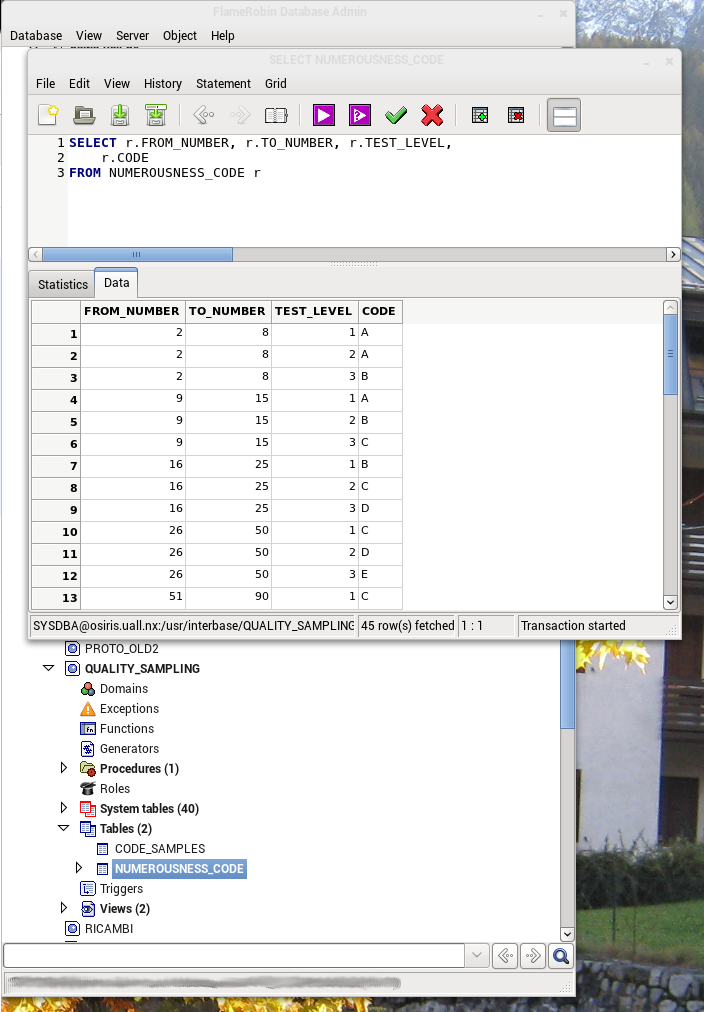
Nella repository di Fedora è presente la release 9.2, ma io ho compilato ed installato l'ultima release dal repository SVN di sourceforge.
FlameRobin is a Database Administrator for the Firebird RDBMS (http://www.flamerobin.org/). To my knowledge it is the only linux native one, but comes also in Win32 and Win64 versions. What I like about this program is that it makes it easy to interact with the database but does not hide the SQL statement. This allows the user to learn SQL statements and to modify the automatically generated statements to fit your purposes.
You can find release 9.2 in Fedora repo, but I have compiled and installed the latest release from the sourceforge SVN repository.
You can find release 9.2 in Fedora repo, but I have compiled and installed the latest release from the sourceforge SVN repository.
martedì 22 novembre 2011
Primary Toolbar
Per ottenere la toolbar principale con gradiente come in nautilus bisogna aggiungere:
To have the new style toolbar with gradient like nautilus main toolbar, you must add:
toolbar1->get_style_context()->add_class(GTK_STYLE_CLASS_PRIMARY_TOOLBAR);
To have the new style toolbar with gradient like nautilus main toolbar, you must add:
toolbar1->get_style_context()->add_class(GTK_STYLE_CLASS_PRIMARY_TOOLBAR);
Shutdown in Gnome-Shell
Per visualizzare la voce Uscita nel menù di gnome-shell bisogna premere il tasto ALT
To show the Shutdown item in gnome-shell menu press the ALT key.
To show the Shutdown item in gnome-shell menu press the ALT key.
No sound on Toshiba notebook with F16
Dopo aver aggiornato il mio portatile Toshiba a F16, l'audio è sparito. Per riavere l'audio ho dovuto aggiungere a:
/etc/modprobe.d/sound.conf
la riga:
options snd-hda-intel model=3stack
After upgrading to F16 my Toshiba notebook, the sound was gone. To get audio back I had to add to:
/etc/modprobe.d/sound.conf
the row:
options snd-hda-intel model=3stack
/etc/modprobe.d/sound.conf
la riga:
options snd-hda-intel model=3stack
After upgrading to F16 my Toshiba notebook, the sound was gone. To get audio back I had to add to:
/etc/modprobe.d/sound.conf
the row:
options snd-hda-intel model=3stack
Iscriviti a:
Post (Atom)